How to add a table to a Jira work item
Guide · Jira Cloud · Updated 12 November 2026
Some data is a list, not a value. A work order has parts and quantities. A purchase request has budget lines. A test has steps and expected results. Jira gives you one value per field, so sooner or later someone asks where the table goes.
There are three common answers. Which one fits depends on a single question: will anyone ever need to filter, total or report on what is inside the table?
1. A table in the description
Type /table in the description (or any rich text field) and Jira inserts a table. It costs nothing and everyone already knows how to use it.
It works well for notes. It stops working when the table becomes data:
- JQL can only do a text search over the whole description. You cannot ask for work items where the quantity is over 100.
- There are no column types. A date column accepts "next Tuesday" and a number column accepts "a few".
- Every work item can end up with a slightly different layout, because nothing enforces the columns.
- Templates help, but the table is still free text once it is created.
Use it when the table is read by people and never by a filter.
2. One child work item per row
Each row becomes a subtask or child work item, with real fields for each column. Now everything is searchable, and each row can have its own assignee and status.
The cost is weight. Twenty parts become twenty work items. Boards fill up, notifications multiply, and entering the rows takes far longer than typing them into a grid. Pasting a block from Excel is not possible without an import.
Use it when each row is real work that someone will pick up and finish.
3. A table custom field
A table field keeps the rows inside one field on the work item. An admin defines the columns and their types once, and every work item gets the same structure.
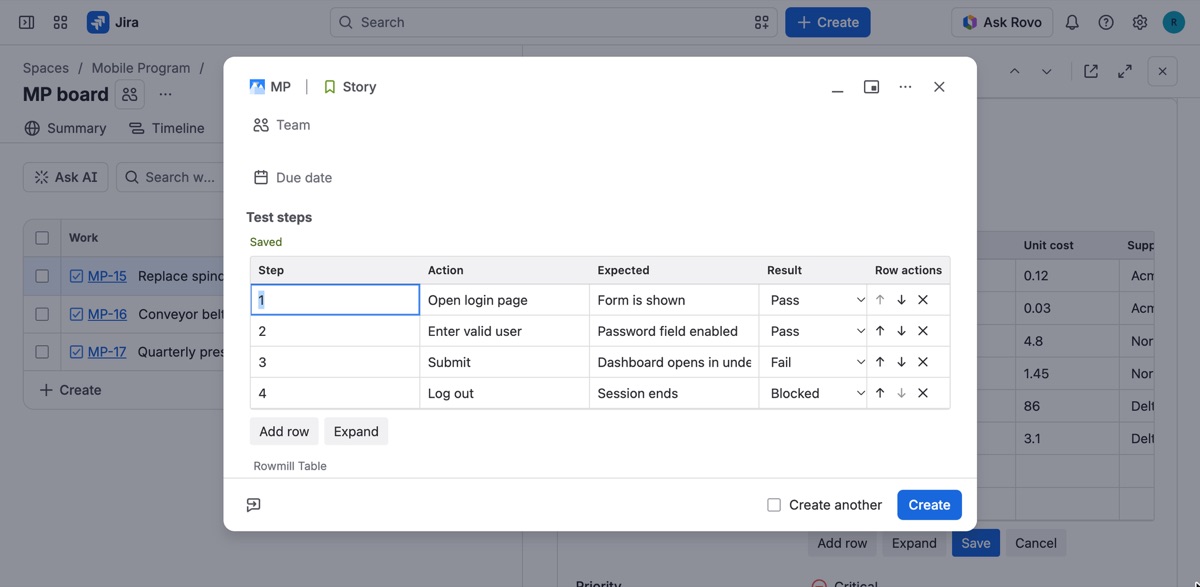
Jira does not ship a field like this, so it comes from an app. What to look for when you compare them:
- Typed columns. Numbers, dates and select lists that reject bad input.
- Works on the Create screen. Some table apps only let you add rows after the work item exists.
- Paste from Excel or Google Sheets. Most tables start life in a spreadsheet.
- Searchable. Can a JQL filter or dashboard use the values in the table?
- Where the data lives. Inside your Jira site, or on the vendor's servers.
We make one: Rowmill Table Grid for Jira. Rows are stored in the Jira field itself, every column gets a JQL alias, and it is free for up to 10 users. It has limits too. Jira caps a field value at 32,768 characters (a few hundred short rows), and JQL matches per work item, not per row. The docs list all of them.
Which one to pick
| You need | Use |
|---|---|
| A quick table that people read | Description table |
| Rows that are separate tasks with owners and status | Child work items |
| Structured rows you can paste, validate and filter on | Table custom field |
Related: Search Jira work items by values inside a table · Move tables from Table Grid or Excel